
Amazon's New AI-Powered Ad Feature: Sponsored Products and Sponsored Brands Prompts Explained
Thursday, May 7, 2026
Amazon moved Sponsored Products prompts and Sponsored Brands prompts from beta to general availability in the U.S. on March 25, 2026. And this AI-powered enhancement could fundamentally change how your ads engage shoppers—but it also comes with new costs and strategic considerations.
If you're running Sponsored Products or Sponsored Brands campaigns, this feature was automatically enabled on your existing campaigns. That means new ad formats, new costs, and new opportunities.
In this guide, we'll break down exactly what Sponsored Products and Sponsored Brands prompts are, how they work, why Amazon launched them, and most importantly—how to manage them strategically to maximize ROI while controlling costs.
What Are Sponsored Products and Sponsored Brands Prompts?
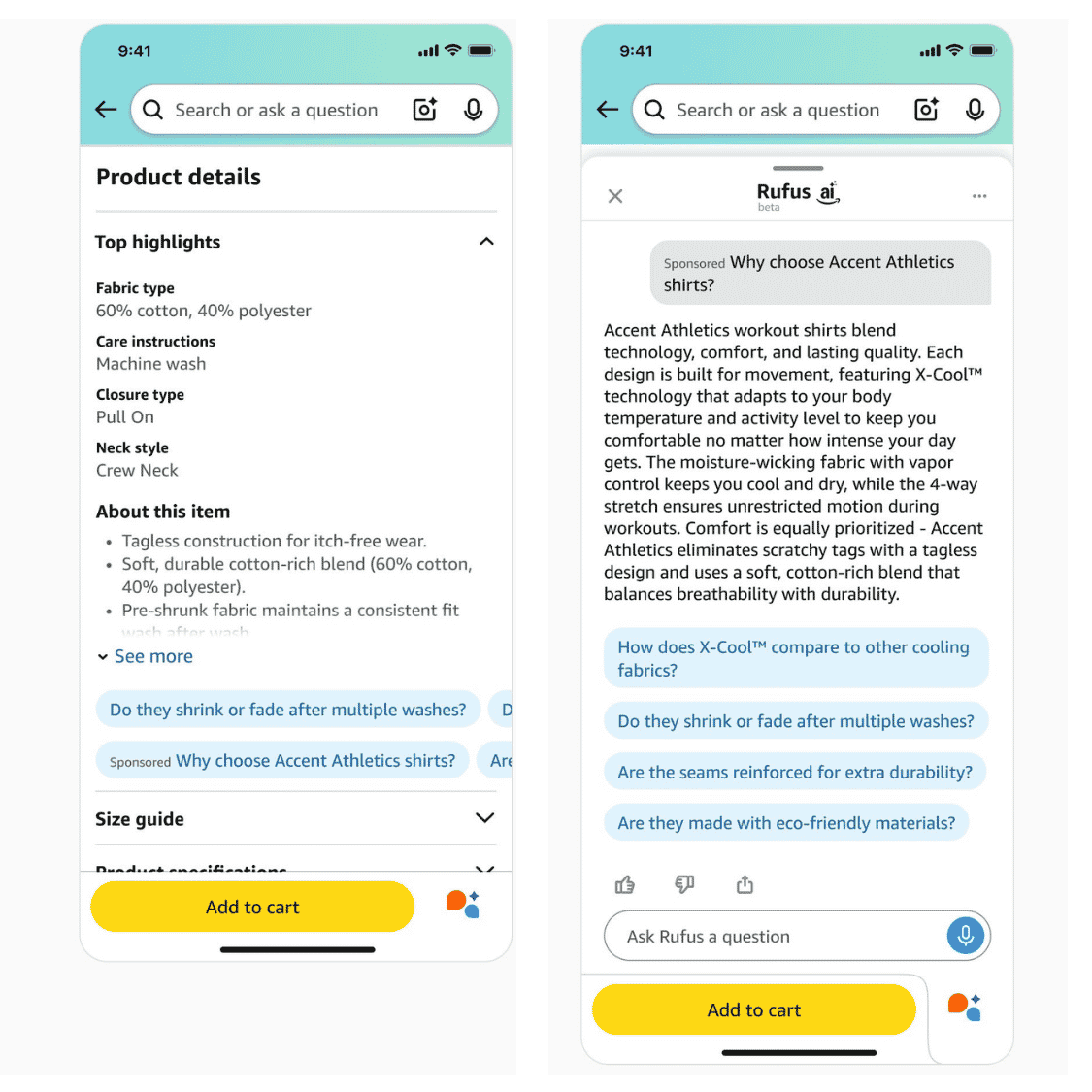
Think of prompts as AI-powered mini-salespeople embedded in your existing ads. They automatically engage shoppers with relevant product information at key decision moments—answering questions before shoppers even need to ask them.
How Prompts Work
Prompts appear alongside your Sponsored Products and Sponsored Brands ads in shopping results pages and product detail pages.
When a shopper clicks a prompt, one of two things happens:
1. A dialog opens inRufus(Amazon's AI shopping assistant) with personalized product information
2. The prompt responds directly on the page where it appeared with relevant details
The AI generates these prompts dynamically using Amazon's first-party data, including:
- Your product detail page content
- Your Brand Store information
- Campaign data and performance signals
- Shopper behavior and context
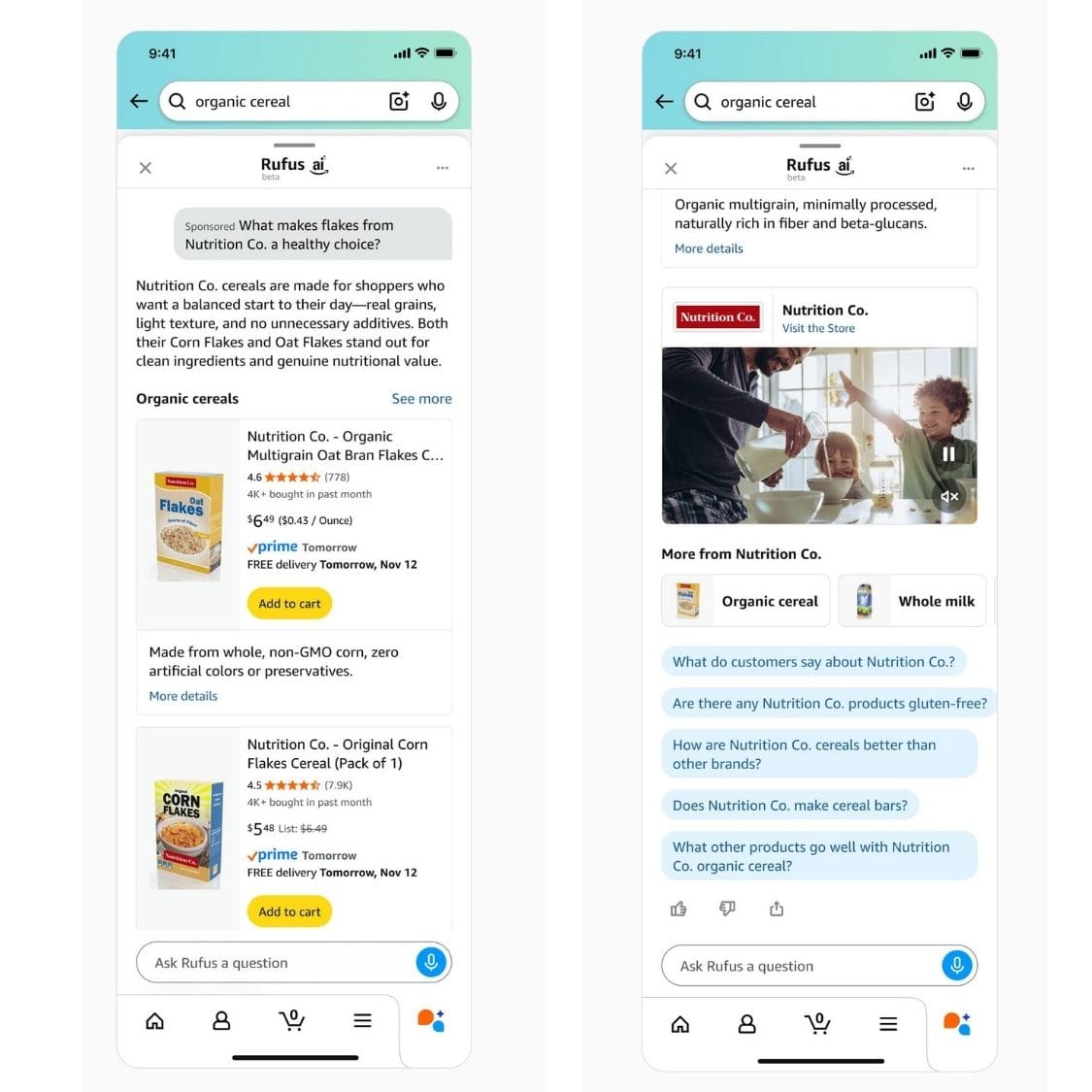
The key difference is that prompts engage shoppers in conversation about your product, surfacing specific details that help them make buying decisions.
Why did Amazon Launch This Feature?
1. Compete with AI Shopping Assistants
Google, ChatGPT, and other AI tools are becoming shopping research hubs. Amazon wants to keep shoppers on its platform by providing AI-powered answers natively.
2. Increase Engagement and Conversion
Prompts turn passive browsing into active engagement. When shoppers interact with prompts, they're more invested in the product—and more likely to buy.
3. Generate More Ad Revenue
Prompts are charged as part of your CPC bidding. Every click on a prompt costs you money, just like a traditional ad click. More engagement = more clicks = more revenue for Amazon.
4. Leverage Amazon's Data Advantage
Amazon has first-party data on shopper behavior, search patterns, and purchase history that no other platform has. Prompts let them monetize this data by surfacing the "right" information at the "right" time.
How to Manage and Monitor Prompts:
In Ads Console:
1. Navigate to Campaign → Ad Group → Ads → Prompts tab
2. View all prompts that have received at least one click
3. See prompt text, associated ad, and performance metrics (impressions, clicks, orders)
4. Pause individual prompts if they're not performing
Via API: Prompts can also be managed programmatically for sellers using Amazon's Advertising API.
Important: Prompts only appear in the interface after they've received at least one click. You can't see or edit them proactively.
The Cost: Prompts Are Charged as Part of Your CPC
During the beta period, prompts were free. Starting March 25, 2026, every click on a prompt will be charged according to your campaign's CPC bidding parameters.
What This Means for Your Budget:
- More click opportunities = higher total spend
- Your ads can now generate clicks from both traditional ad placements AND prompts
- If your daily budget was optimized for traditional clicks only, it may run out faster
- Different conversion rates
- Prompt clicks might convert better (shoppers getting questions answered) or worse (curiosity clicks without purchase intent)
- You won't know until you have data
- Same bid, different placements
- You can't bid separately on prompts vs. traditional ad clicks
- They use the same CPC structure as your existing campaigns
How to Monitor Prompt Performance
Amazon provides dedicated reporting for prompts, accessible through the Ads Console.
Accessing Prompt Reports:
1. Go to Reports in Ads Console
2. Select Create Report
3. Set report category to Sponsored Products or Sponsored Brands
4. Choose Prompts as the report type
5. Select your preferred time unit and report period
6. Run the report
What the Report Shows:
- Prompt text (what the AI generated)
- Associated ad (which product/campaign)
- Impressions (how many shoppers saw the prompt)
- Clicks (how many engaged with it)
- Click-through rate (CTR)
- Cost per click (CPC)
- Spend (total cost of prompt clicks)
- Sales (revenue attributed to prompt clicks)
- ACoS (Advertising Cost of Sale for prompts)
- ROAS (Return on Ad Spend for prompts)
- 7-day orders and units
This data is critical for determining whether prompts are helping or hurting your campaign performance.
Strategic Considerations: Should You Use Prompts?
Prompts are automatically enabled, but you can pause them at the campaign level. Here's how to think strategically about whether to keep them active.
When Prompts Might Help:
✅ Products with common questions that aren't obvious from images
- Technical products (electronics, tools, appliances)
- Products with specific use cases (fitness equipment, baby products)
- Products with material/safety concerns (BPA-free, hypoallergenic, etc.)
✅ High-consideration purchases
- Expensive items where shoppers research extensively
- Products with multiple variants or configurations
- Categories where detailed specs matter
✅ Products with strong detail pages and Brand Stores
- The AI pulls from your existing content—better content = better prompts
- Comprehensive A+ Content gives the AI more material to work with
✅ Campaigns with budget headroom
- If your daily budget isn't maxing out, prompts can drive incremental traffic
- Extra clicks won't hurt if you have capacity
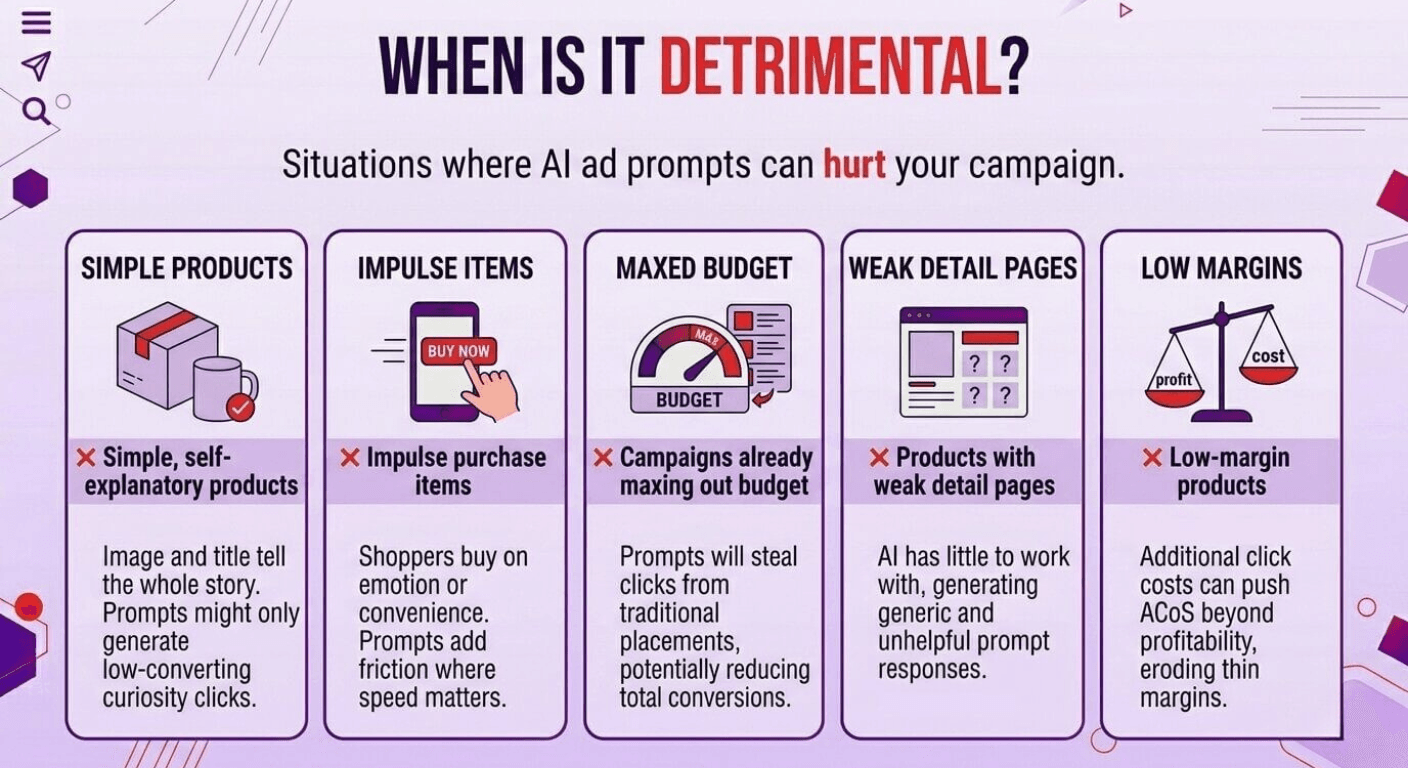
When Prompts Might Hurt:
❌ Simple, self-explanatory products
- If your product image and title tell the whole story, prompts might just generate curiosity clicks that don't convert
❌ Impulse purchase items
- Shoppers are buying on emotion or convenience
- Prompts add friction where speed matters
❌ Campaigns already maxing out budget
- If your budget runs out early in the day, prompts will steal clicks from traditional placements
- You might get fewer total conversions
❌ Products with weak detail pages
- If your listing content is sparse, the AI has little to work with
- Prompts might generate generic, unhelpful responses
❌ Low-margin products
- If you're already operating on thin margins, additional click costs (even at the same CPC) might push ACoS beyond profitability
Don't Let New Features Surprise You—Stay Ahead of Changes
Amazon launches new advertising features constantly. Prompts are just the latest example. Sellers who react quickly, test strategically, and optimize based on data stay ahead. Those who ignore new features or manage them passively fall behind.
The difference between thriving and struggling on Amazon often comes down to how fast you adapt to changes—and whether you have the time and expertise to do it right.
Get Your Free PPC Strategy Review
Not sure if your campaigns are ready for prompts?
👉 Get your free PPC strategy review now and make sure you're prepared for Sponsored Products and Sponsored Brands prompts.
Share this article
Free for Amazon Sellers
Get the FREE 4-Step Amazon Growth Strategy
The exact framework used by 4,000+ Amazon brands to launch, optimize, and scale — yours free.